The world of sound is a vast, ever-evolving landscape, and few techniques capture the imagination quite like the "slowed + reverb" effect. It's a method for transforming familiar melodies into something profoundly new, an ethereal whisper echoing from a dream. But achieving that perfect, atmospheric magic isn't just about dragging a slider; it's about Mastering Slowed + Reverb Parameters & Settings. This guide will show you how to move beyond basic application, giving you the control to sculpt truly immersive and emotionally resonant tracks.
Ready to dive into the art and science of turning sound into an experience? Let's get started.
At a Glance: Crafting Your Ethereal Soundscape
- The Core: Slowing a track (10-30%) while preserving pitch, then layering it with carefully chosen reverb creates an immersive, emotional experience.
- Software Savvy: Audacity and GarageBand are excellent free starting points; professional DAWs like Ableton Live, FL Studio, and Logic Pro X offer advanced control.
- Prep is Key: Always use lossless audio (WAV, FLAC), organize your files, and back up your originals before you begin editing.
- Slowing Down: Utilize your DAW's tempo/time-stretching features (e.g., Audacity's "Change Tempo," FL Studio's "Stretch," Logic Pro X's "Varispeed") to reduce tempo without altering pitch.
- Reverb Mastery: Focus on Decay Time (how long the reverb lasts), Pre-Delay (gap before reverb starts), Filters (EQ to prevent muddiness), and using Send Effects for cohesion.
- The Ethereal Formula: A 10-20% tempo reduction, combined with long decay reverbs and subtle ambient layers, forms the foundation.
- Advanced Moves: Experiment with two reverbs (short/bright, long/dark), modulation effects, and targeted EQ on your reverb tails.
- Legal Note: Monetizing slowed + reverb remixes often requires permission from the original rights holder due to copyright.
The Allure of Slowed + Reverb: Why It Captivates
There’s a reason slowed + reverb tracks dominate playlists and create viral moments: they tap into something primal. This technique takes a song, reduces its tempo, and wraps it in a shimmering blanket of reverberation, turning a familiar tune into a vast, spacious soundscape. The result is often deeply soothing, introspective, and capable of evoking strong emotional responses.
The magic lies in how slowing a track emphasizes its melodic and harmonic elements, allowing details to unfurl slowly, while reverb simulates the natural reflections of sound in an acoustic space—making your music feel enormous, immersive, and sometimes, even spiritual. It's not just about applying an effect; it's about transforming the very essence of a song.
Laying the Groundwork: Your Pre-Production Checklist
Before you even touch a slider, a little preparation goes a long way. Think of it as preparing your canvas before painting; the quality of your base affects everything that follows.
- Choose Your Source Wisely: Always start with the highest quality audio file you can get your hands on. Lossless formats like WAV or FLAC are ideal because they retain all the original audio data. MP3s, being lossy, have already discarded some information, and further processing can exacerbate any quality degradation.
- Stay Organized: Create a dedicated project folder for each slowed + reverb endeavor. Label your files clearly (e.g., "Original Track.wav," "Slowed Version.wav," "Reverb Wet.wav"). This simple habit will save you headaches as your projects grow.
- Convert if Necessary: If your source file isn't in a lossless format, consider converting it. Most digital audio workstations (DAWs) and free converters can handle this.
- Backup, Backup, Backup: This cannot be stressed enough. Before you make any edits, create a duplicate of your original track. That way, you always have a pristine version to revert to if something goes awry or you want to try a different approach.
Your Toolkit: Software for Crafting Ethereal Sounds
The beauty of music production today is the sheer accessibility of powerful tools. Whether you're a beginner or a seasoned pro, there's a DAW that fits your workflow.
- Recommended Starting Points (Free & Accessible):
- Audacity: This free, open-source, cross-platform audio editor is incredibly versatile. It's fantastic for basic tempo changes and applying reverb, making it a perfect entry point for experimenting.
- GarageBand: If you're on macOS or iOS, GarageBand is pre-installed and remarkably intuitive. It offers a user-friendly interface for both slowing tracks and adding its built-in reverb effects.
- Professional Powerhouses (Paid & Feature-Rich):
- Ableton Live, FL Studio, Logic Pro X, Adobe Audition, Reaper, Pro Tools: These are industry-standard DAWs that offer extensive control over every aspect of audio manipulation. They provide advanced time-stretching algorithms and a vast array of high-quality reverb plugins, giving you unparalleled flexibility.
- On the Go (Mobile Options):
- iPhone's Voice Memos: Surprisingly useful for capturing initial ideas.
- GarageBand (iOS): A mobile version offering similar capabilities to its desktop counterpart.
- FL Studio Mobile (iOS/Android/Windows): A robust option for creating and editing tracks on various mobile devices.
The Art of Slowing Down: Mastering Tempo Without Pitch Distortion
The first crucial step in "slowed + reverb" is, naturally, the slowing down. But it's not just about dragging an audio clip; it's about altering the tempo without changing the pitch. This is where time-stretching algorithms come into play.
The Golden Range: A tempo reduction of 10% to 30% is generally the sweet spot for slowed tracks. Going too slow can turn it into an unrecognizable drone, while too little might not achieve the desired atmospheric shift. Start with 15-20% and adjust to taste.
How to Slow Down in Popular DAWs:
- Audacity:
- Import your audio file (File > Import > Audio).
- Select the entire track.
- Go to
Effect > Change Tempo.... - Enter a negative percentage (e.g., "-20%" for a 20% reduction) or adjust the slider. Ensure "Use high-quality stretching (slow)" is checked for best results. Preview and confirm.
- FL Studio:
- Drag your audio clip into the Playlist.
- Click the audio clip to open its Channel Settings.
- In the "Time" section, click the
Modedropdown and selectStretch. - You can now adjust the
Tempoknob or directly stretch the clip in the Playlist view, and FL Studio will automatically preserve pitch.
- Logic Pro X:
- Import your audio file.
- Enable
Flex Timefor the track (the small Flex icon on the track header). - You can now use
Varispeed(found in the main transport controls) or manually stretch regions in the arrangement window, and Logic will preserve pitch.
- GarageBand:
- Import your audio file.
- Adjust the
BPM sliderin the control bar at the top of the interface. GarageBand'sFlex Timecapabilities ensure pitch preservation.
Experimentation is key here. Listen closely to how the rhythm and melodic phrases react to different tempo reductions. The goal is to create a new groove, not simply a sluggish version of the original.
Unlocking Spatial Magic: Demystifying Reverb Parameters
With your track slowed, it's time to immerse it in space. Reverb is your brush, and its parameters are your colors. Understanding each setting is crucial for sculpting the exact atmosphere you envision. While you can quickly experiment with the basic effect using Our slow and reverb generator, true mastery comes from tweaking these parameters in your DAW.
1. Decay Time (or Size/Length):
This is arguably the most impactful parameter for slowed + reverb. Decay time dictates how long the reverb tail lasts—how long the "echo" lingers.
- For Ethereal Soundscapes: You'll generally want longer decay times, often in the range of 1.85 seconds or more, to create that vast, spacious feeling.
- Practical Range: While 0.5 to 2 seconds is common for general mixing, don't be afraid to push it to 3-5 seconds or even longer for extreme atmospheric effects in slowed + reverb.
- Tip: If a long decay makes your mix muddy, try halving it (e.g., from 1.85s to 0.95s) to see if it fits better rhythmically with the track's new, slower tempo.
2. Pre-Delay:
Pre-delay is the short gap of silence between the original, "dry" sound and the onset of the reverb. It's vital for creating depth and clarity. - Why it Matters: A longer pre-delay suggests a larger room, as it takes more time for sound to reach the reflective surfaces. It also helps to preserve the initial transient (attack) of your dry sound, preventing the reverb from muddying the immediate impact.
- Recommendation: Start between 8 and 20 milliseconds. Use lower values (8-12ms) for shorter decay times or tighter, more focused reverbs, and higher values (15-20ms+) for longer decays to really push the dry sound forward from the wash.
3. Damping:
Damping simulates how different frequencies are absorbed by surfaces in a real room. Higher frequencies (treble) are usually absorbed more quickly than lower frequencies (bass). - Effect: Increasing damping will make the reverb tail sound darker and less bright, as the high frequencies fade out faster. Lower damping keeps the high frequencies ringing longer.
- For Ethereal: Often, a slightly higher damping can contribute to a warmer, less harsh, and more "vintage" or dreamy reverb sound.
4. Color/Tone:
Many reverb plugins offer "color" or "tone" controls, which are essentially built-in EQ curves or algorithms that shape the reverb's character. - Subjective Tweaking: This is where you fine-tune the reverb's overall brightness, warmth, or darkness. The goal is usually a clean, natural, and solid sound that complements the slowed track.
5. Filters (EQ on Reverb): The Secret Weapon Against Muddiness
Applying an Equalizer (EQ) to your reverb signal is absolutely critical. Without it, long reverb tails can quickly swamp your mix with unwanted low-end rumble or harsh high-frequency sizzle. - The Abbey Road Reverb Trick: A classic technique involves placing an EQ after your reverb plugin (or using the plugin's built-in filters) and applying a high-pass filter to cut frequencies below 600Hz and a low-pass filter to cut frequencies above 6000Hz. This carves out the essential mid-range of the reverb, making it audible without being muddy or shrill.
- For Warmth: If 600Hz feels too aggressive, try shifting the high-pass up to 550Hz and the low-pass down to 5500Hz for a slightly warmer, darker reverb.
- Implementation: If your reverb plugin doesn't have robust built-in filters, simply insert a separate EQ plugin immediately after the reverb on your Aux/Return track.
6. Width:
This parameter controls how much stereo space the reverb occupies, from mono (center) to super-wide (extending far into the stereo field). - Recommendation: A starting point might be around 60% width. Adjust to taste: pull it down for busy mixes where the reverb shouldn't compete too much, or push it wider (up to 100% or even beyond with some plugins) for a truly expansive sound.
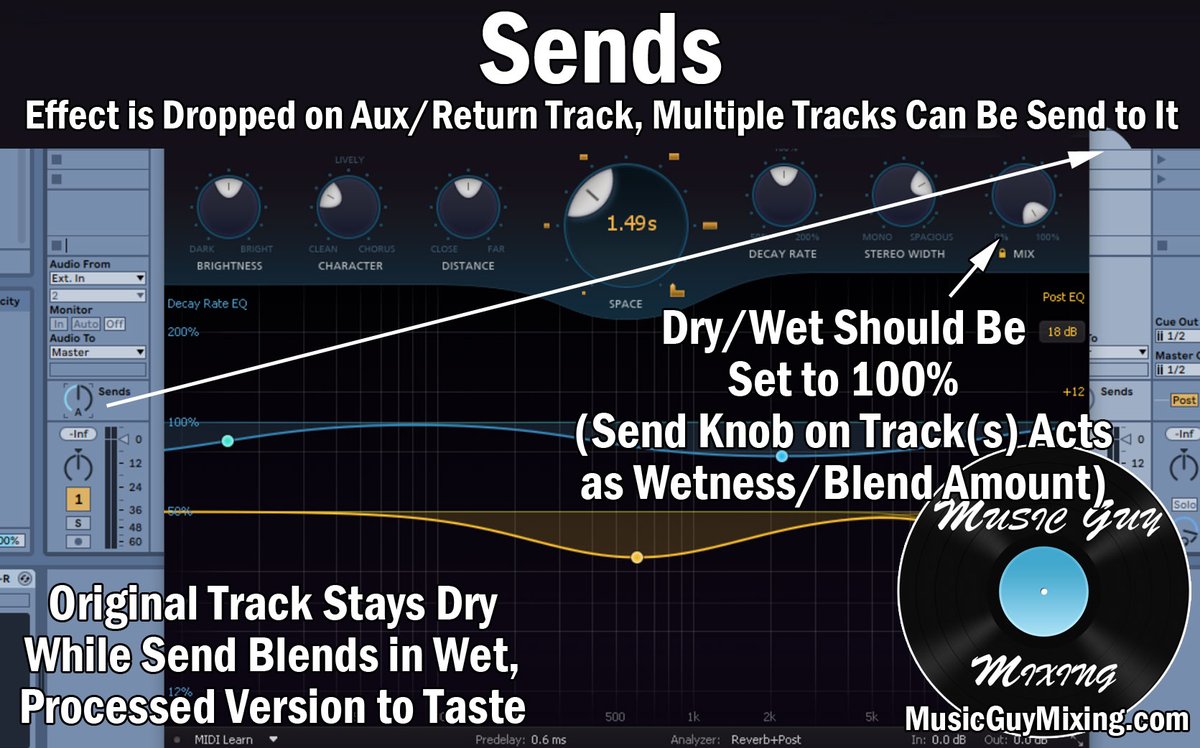
7. Mix/Wetness (Crucial for Send Effects):
When using reverb as a send effect (which is almost always recommended for cohesion), always set the reverb plugin's internal wet/dry knob to 100% wet. - Why 100% Wet? You're sending a portion of your dry signal to a separate reverb track. This reverb track should only contain the wet, processed signal. The amount of reverb for each individual track is then controlled by the send knob on that track, allowing you to blend different amounts of the same reverb "room" into multiple elements, creating a unified sonic space. If you're using reverb as an insert effect directly on a track, then you'd adjust the mix knob to blend dry and wet signals on that single track.
Techniques for an Immersive Soundscape
Now that you understand the individual controls, let's put them together to build truly captivating soundscapes.
- Choosing Your Reverb Type: Don't just pick "Default." Different reverb algorithms simulate different spaces:
- Hall Reverbs: Great for long, smooth decays; ideal for cinematic, grand, or ethereal sounds.
- Plate Reverbs: Known for their bright, dense, and slightly metallic sound; excellent for vocals and drums, adding a classic sheen.
- Room Reverbs: Simulate smaller, more natural spaces; can be used for subtle spaciousness without overwhelming the track.
- Shimmer Reverbs: Often feature pitch-shifted delays within the reverb tail, creating a heavenly, angelic effect perfect for ethereal textures.
- Experimentation is key. Each type has its own character and can profoundly impact the mood.
- Balancing Wet/Dry vs. Send Effects:
- Send Effects (Recommended): As discussed, this is the most flexible and professional approach. Set your reverb plugin to 100% wet on an Aux/Return track. Then, use send knobs on your individual instrument tracks (or your master slowed track) to dial in the desired amount of reverb. This creates a cohesive "space" where all elements feel like they belong.
- Insert Effects (Use Sparingly): Placing a reverb directly on a track (as an insert) can work for specific, isolated elements, but it's harder to manage across an entire mix and can quickly make things sound cluttered.
- Layering & Modulation for Depth:
- Subtle Ambient Pads: Layering soft, sustained synth pads or drone textures underneath your slowed track can dramatically enhance its ethereal quality. These should be mixed very low, almost subliminally.
- Modulation Effects: Introduce subtle movement and shimmer with:
- Chorus: Adds thickness and a swirling motion.
- Flanger/Phaser: Can create more dramatic, metallic sweeps or subtle spatial shifts.
- Stereo Panning: Don't keep everything dead center. Pan elements slightly to the left or right to open up the mix and create a wider, more enveloping soundstage.
- The "Ethereal Formula" in Practice:
- Slow Down: Start by slowing your track by 10-20%, ensuring pitch preservation.
- Long Decay Reverb: Apply a high-quality reverb (e.g., a Hall or Shimmer type) with a long decay time (2-4 seconds or more).
- Subtle Mix: Adjust the wet/dry balance (if an insert) or send amount (if an Aux effect) so the reverb is clearly audible but not overpowering. It should envelop the sound, not drown it.
- EQ the Reverb: Crucially, apply EQ to the reverb signal itself (as described in the "Filters" section) to remove muddiness and harshness.
- Add Layers: Consider adding quiet, sustained ambient pads or delicate synth textures to fill out the sonic space.
- Movement: Gently experiment with stereo panning and subtle chorus/flanger on elements of your track or even the reverb itself.
Beyond the Basics: Advanced Slowed + Reverb Strategies
Once you're comfortable with the core techniques, consider these advanced methods to add unique character and dynamism to your slowed + reverb productions.
- Using Two Reverbs for Dynamic Depth:
This powerful technique involves creating two distinct "rooms" within your mix, adding both short-term realism and long-term atmosphere.
- Set up Two Aux Tracks: Create two separate Aux/Return tracks, each with its own reverb plugin, both set to 100% wet.
- Short & Bright: On the first Aux, set a shorter decay time (e.g., 0.8-1.5 seconds) with a slightly brighter tone (less damping, higher high-pass filter on the EQ). This acts as a more immediate, natural reflection.
- Long & Dark: On the second Aux, use a much longer decay time (3-5+ seconds) with a darker tone (more damping, slightly lower low-pass filter on the EQ). This creates the deep, ethereal wash.
- Strategic Blending: Send different amounts of your main slowed track (or individual elements) to each reverb. You might use the shorter reverb for most of the track, then "open up" the longer, darker reverb during choruses, breakdowns, or key emotional moments for added emphasis and contrast. This creates natural mix automation and keeps listeners engaged.
- Chopped and Screwed with a Twist:
While a distinct genre, you can integrate elements of "Chopped and Screwed" into your slowed + reverb tracks for rhythmic variation.
- Isolate the Beat: Identify and isolate key rhythmic elements or phrases.
- Extreme Slowdown: Slow these sections down by 20-40%, again preserving pitch.
- Reverb & Rearrange: Add a generous amount of reverb. Then, experiment with cutting, stopping, and restarting these slowed, reverbed beat sections, creating unexpected rhythmic shifts and dramatic pauses. This introduces a unique dynamic to the otherwise smooth slowed + reverb flow.
- Emulating Artist Styles:
To truly master the craft, analyze your favorite slowed + reverb artists or producers.
- Deconstruct the Sound: Listen for specific effects: Are the vocals auto-tuned or heavily saturated? Are there prominent 808s or intricate hi-hat patterns? What kind of synth melodies are used?
- Reverse Engineer: Try to replicate these elements. This isn't about copying, but understanding the building blocks of sounds you admire. This practice will sharpen your ears and expand your creative vocabulary.
Troubleshooting & FAQs: Your Quick Reference Guide
Even seasoned producers run into snags. Here are answers to some common questions about working with slowed + reverb.
- How do I achieve this in FL Studio?
- For tempo change (pitch preserved), drag your audio clip to the Playlist, then click it to open its Channel Settings. In the "Time" section, set the
ModetoStretch. You can then stretch the clip in the Playlist, or adjust the tempo knob in the Channel Settings. - For reverb, use the built-in
Fruity Reeverb 2plugin. Experiment withDecay,Pre-Delay, and especially theWetknob (100% wet if on a send/return track). - What about Logic Pro X?
- Tempo change (pitch preserved) is handled by
Flex Time. Enable it on your track, then you can useVarispeed(a global tempo control) or manually stretch regions in the arrangement window. - Logic offers excellent built-in reverb plugins like
Space Designer(convolution reverb for realistic spaces) andChromaVerb(algorithmic, more creative). Pay attention to theirDecay,Pre-Delay, and internal EQ/filter settings. - And GarageBand?
- For tempo adjustment, use the
BPM sliderin the control bar. GarageBand's underlyingFlex Timefunctionality will handle pitch preservation. - To apply reverb, select your track, open the
Smart Controlspanel (usually the 'B' key), and you'll find aReverbknob under theMasterorTracktab. For more control, add an effect via thePluginssection within Smart Controls. - Can I make money from slowed + reverb remixes?
- This is a legal gray area. Generally, creating derivative works like slowed + reverb remixes requires permission or a license from the original rights holder. Without it, you could face copyright infringement issues if you monetize or widely distribute the track. Always err on the side of caution and seek legal counsel if you plan to commercialize your work.
- Why is slowed + reverb so appealing?
- The slowed tempo emphasizes the song's core melody and harmonies, often creating a more relaxed, contemplative feel. The added reverb then builds an immersive, often melancholic or dreamy atmosphere. This combination taps into strong emotional responses, offering a sense of nostalgia, introspection, or simply a deep, soothing escape.
Your Next Steps: Elevating Your Sonic Creations
You now have a robust understanding of Mastering Slowed + Reverb Parameters & Settings. The journey, however, doesn't end here; it only just begins.
Your next steps should involve active experimentation. Choose a favorite track, back it up, and start playing. Try different tempo reductions. Cycle through various reverb types. Practice applying EQ to your reverb tails until it sounds clean and expansive. Don't be afraid to break the "rules" and push parameters to their extremes to understand their full potential.
The ethereal soundscape you're chasing isn't found in a single setting but in the nuanced interplay of these powerful tools. Keep practicing, keep listening, and most importantly, keep creating. The magic is in your hands.